 OnStream
Get the OnStream App for Android & Smart TVs
App Name
OnStream
Version
v1.2.1
Size
15.4 MB
Downloads
5 Million+
Ratings
4.8+
Price
Free
Looking for a unified way to manage your media? Whether you're trying to organize your watchlist or seeking a more streamlined interface for your Android device, OnStream acts as a powerful aggregator for modern streaming needs. It takes the hassle out of jumping between different platforms by offering a single, clean dashboard.
Core Features and Benefits
We believe that managing your entertainment should be as enjoyable as watching it. Instead of dealing with fragmented interfaces across a dozen different services, using a dedicated aggregator provides a much smoother experience.
No Sign-Ups Required
Jump straight into the dashboard without having to hand over an email address or credit card. Total anonymity guaranteed from the second you launch the application.
Adaptive Resolution
The built-in media player automatically adjusts video quality based on your current network stability, ensuring zero buffering.
Local Caching
Cache select media directly to your device's local storage for offline viewing.
Global Subtitles
Hooks into major open-source databases to load captions in dozens of languages instantly.
Smart TV Casting
Send media directly from your phone to your living room TV seamlessly via Chromecast and DLNA protocols. Keep your phone completely free while watching on the big screen.
How to Download Free Movies on OnStream App
Search Your Movie
Open the app and use the top search bar to find the exact movie or TV show you want to watch.
Select a Server
Tap on the movie poster and choose one of the fast, high-quality streaming servers from the list provided.
Tap Download
Look for the download icon right below the video player. Tap it to start saving the media directly to your device.
Watch Offline
Once finished, navigate to your 'Downloads' tab. You can now watch your movie anywhere, anytime, without an internet connection!
Why ditch your old streaming apps?
Let's be real—most free movie apps are a nightmare to use. Here is why OnStream actually feels like a premium service you'd usually pay for.
Everything in One Place
Since OnStream searches the web for links instead of hosting them, it isn't locked down by exclusive network deals. You get to search across almost every movie and show ever made, all from a single search bar.
No Annoying Pop-ups
We all hate trying to click 'play' only to be hit with three invisible pop-up ads and a shady redirect. OnStream keeps the interface clean so you can just tap your movie and start watching in peace.
Lightning Fast Servers
Say goodbye to endless buffering wheels. The app connects to high-speed premium servers under the hood, meaning your 4K movies load up fast and actually play smoothly without constant pausing.
How to Install OnStream
Since OnStream is a third-party link aggregator, you won't find it on the official Google Play Store. Don't worry—installing it directly to your device (called sideloading) takes less than two minutes.
For Android Phones & Tablets
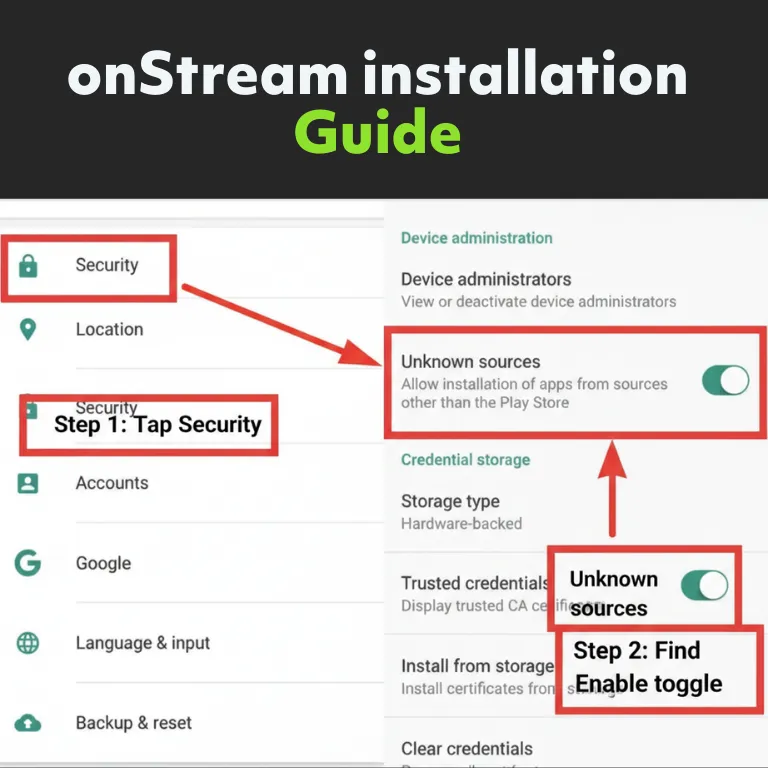
- First, open your phone's Settings app and navigate to the Security or Privacy tab.
- Look for a toggle labeled Install from Unknown Sources (or "Install Unknown Apps") and flip it to the "on" position. This grants your browser permission to download files directly.
- Tap the download button at the top of this page to save the installation file to your device.
- Open your phone's File Manager, locate the downloaded file in your Downloads folder, and tap it to complete the installation.
Setting Up Amazon Fire TV or Android TV
- Power on your TV and navigate to the search icon on the home screen. Search for and install an app called Downloader.
- Next, go to your TV's Settings > My Fire TV > Developer Options, and turn on the setting for Apps from Unknown Sources.
- Launch the Downloader app and enter `onstream.pk` into the address bar to navigate to this site.
- Use your remote to click the download button and install the application directly to your television.
How to Update the App
We push updates frequently to add new server sources and fix broken links. Here is the easiest way to stay current.
1. In-App Notification
When a new version is released, you will receive an automatic prompt immediately upon opening the application.
2. Download Update
Tap 'Update Now' to fetch the latest secure APK directly from our high-speed servers. The download happens silently.
3. Install & Overwrite
Run the newly downloaded APK. It will safely overwrite your current version while keeping your watch history completely intact.
OnStream vs. The Clones
Tired of apps that promise free movies but deliver a broken, ad-filled experience? Here is a quick look at how we stack up against the rest.
| Core Features | OnStream | Other Free Apps |
|---|---|---|
| Account Requirement | No Sign-Up Needed | Forced Registration |
| Ad Intrusiveness | Zero Pop-Ups | Heavy Pop-Ups & Redirects |
| Video Quality | Up to 4K / Adaptive | Capped at 720p or 1080p |
| Offline Downloads | Native & Unlimited | Often Restricted or Paid |
| Playback Buffering | Minimal (Premium Servers) | High (Overloaded Servers) |
| Subtitle Support | Auto-Sync, Global Options | Manual Search Required |
| Smart TV Casting | Seamless Chromecast Support | Glitchy or Unavailable |
Privacy and Network Safety Recommendations
We understand that downloading software from outside official app stores can raise security questions. We routinely scan the provided installation files using industry-standard tools like VirusTotal to ensure they are free of malware or background mining scripts.
However, it's important to understand how media aggregators work. Because they pull video links from various third-party servers across the internet, your Internet Service Provider (ISP) can theoretically monitor which IP addresses your device is connecting to. For peace of mind, many users prefer to run a Virtual Private Network (VPN) while using these types of applications to keep their connection encrypted and anonymous.
Frequently Asked Questions
Is this application free to use?
Yes, the application is completely free and requires no account creation or subscription fees.
Can I install this on Apple devices?
Currently, the app is only built for the Android operating system (.apk format) and is not compatible with iOS or Apple TV ecosystems.
What should I do if the media keeps buffering?
Buffering is usually caused by network congestion. We recommend pausing the video for 30-60 seconds to allow the player to build up a healthy cache before resuming playback.